
Restore Chrome Tab Update Dots
Genel Bakış
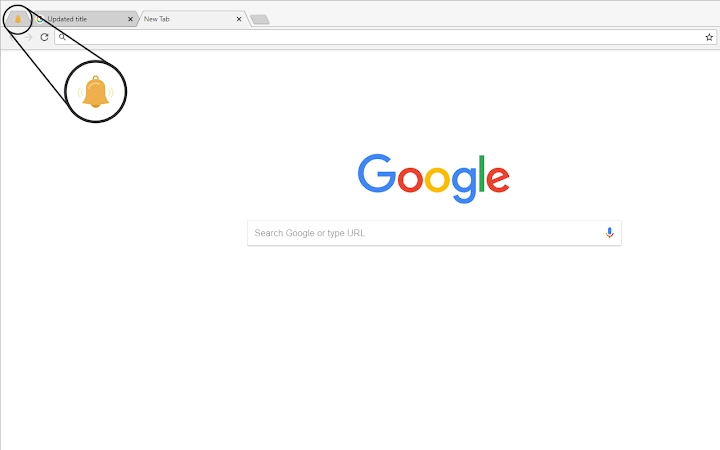
The Restore Chrome Tab Update Dots extension is designed to bring back a long-missed visual cue in Google Chrome: the small dot that once appeared next to updated tabs. This feature was previously available in older Chrome versions and was particularly useful for users who rely on web applications such as Slack, Mattermost, and other real-time tools. Without this indicator, identifying which tabs have new content can become challenging, especially when managing multiple open windows.
Targeted primarily at professionals and power users who depend on timely updates from web-based platforms, the extension helps maintain workflow efficiency by offering a simple yet effective visual signal. The developer, willg101, has made the tool open-source under the MIT license, allowing transparency and community contributions. This fosters trust and ensures the software remains free from hidden tracking mechanisms.
Real-world usage scenarios include monitoring team collaboration tools, tracking project updates, or staying informed during active remote work sessions. The extension operates silently in the background, requiring no user intervention once installed. It is compatible with Windows, Mac, and Linux systems, making it accessible to a broad audience across different computing environments.
Ana Özellikler ve Yetkinlikler
- Tab güncelleme noktalarını yeniden getirir – Bir sekme güncellendiğinde gösteren görsel göstergesi geri getirir, yeni içerik farkındalığını artırır.
- Yapılandırılabilir yanıp sönme davranışı – Dikkat dağıtıcı bulabilecek kullanıcılar için yanıp sönme animasyonu devre dışı bırakılabilir, kullanıcı konforunu artırır.
- Açık kaynak ve MIT lisanslı – Tam kod şeffaflığı güvenliği sağlar ve geliştiricilerin projeyi incelemesine veya katkıda bulunmasına olanak tanır.
- Gizlilik odaklı tasarım – Veri toplama veya izleme yok; uzantı dış iletişim olmadan yerel olarak çalışır.
- Hafif ayak izi – Sadece 256 KB dosya boyutu ile sistem kaynaklarını minimal düzeyde kullanır.
These features are particularly beneficial in high-productivity workflows where users manage dozens of tabs simultaneously. For example, a remote team member using Slack and Mattermost can instantly identify which channels have received new messages without manually checking each tab. The option to disable flashing ensures the extension remains unobtrusive for users sensitive to visual distractions.
Because the extension runs entirely within the browser environment, it does not require external dependencies or background processes. Its functionality is limited to monitoring tab updates and rendering the dot indicator, ensuring a focused and reliable experience.
Kullanıcı Arayüzü, İş Akışı ve Performans
The extension integrates seamlessly into the Chrome browser interface, appearing only as a small dot next to the relevant tab icon when content is updated. There is no additional UI element or settings panel within the browser’s main interface, which keeps the experience clean and distraction-free.
Navigation and interaction are minimal—once installed, the extension functions automatically without requiring user input. No configuration is needed to begin using it, and users can adjust preferences through the extension’s settings page if desired. The workflow is designed to be intuitive and immediate, with no learning curve.
Performance details were not specified by the developer. However, given its lightweight nature and open-source architecture, the extension is expected to have minimal impact on system resources. The developer did not provide additional system requirements or performance benchmarks. General software behavior suggests that such a lightweight utility should not significantly affect CPU or RAM usage during normal operation.
Stability appears to be maintained through consistent updates and community-driven improvements. Version 1.3.0, released on October 26, 2018, included a privacy policy, reflecting ongoing attention to user trust and transparency.
Uyumluluk ve Sistem Gereksinimleri
The extension is compatible with Windows, Mac, and Linux operating systems, ensuring broad accessibility across desktop environments. It is designed to work with Google Chrome, though specific version compatibility was not provided.
The installation size is listed as 256 KB, indicating a minimal footprint on disk space. This small size contributes to quick installation and low storage impact.
Exact system requirements were not listed. The developer did not specify minimum CPU, RAM, or disk space needs. Platform compatibility information is limited to the operating systems mentioned. Users should ensure their system meets general Chrome requirements for extensions to function properly.
Artılar ve Eksiler
Artılar
- Modern Chrome sürümlerinde eksik olan faydalı bir görsel göstergeyi geri getirir
- Açık kaynak ve MIT lisanslı—tamamen şeffaf ve güvenilir
- Yalnızca 256 KB depolama alanı kullanır
- Veri toplama veya izleme olmadan gizlilik odaklı
- Yapılandırılabilir davranış, yanıp sönmeyi isteğe bağlı olarak devre dışı bırakma
Eksiler
- Chrome dışındaki tarayıcılara resmi destek yok
- Sürüm geçmişi ve güncellemeler 2018'deki tek sürümle sınırlı
- Gelişmiş özelleştirme seçenekleri olmayan minimal kullanıcı arayüzü
- Temel sekme izleme dışındaki çevrim dışı kullanım desteklenmez
- Yerleşik güncelleme bildirimleri veya otomatik güncelleme özelliği yok
SSS Bölümü
Bu uzantı kullanmak güvenli mi?
Evet, uzantı açık kaynak ve MIT lisanslıdır, yani kodu herkes tarafından incelenebilir. Kullanıcı verisi toplamaz veya etkinlik izleme yapmaz, bu da günlük kullanım için güvenli olmasını sağlar.
Bunu Mac, Windows ve Linux'ta kullanabilir miyim?
Evet, uzantı Windows, Mac ve Linux sistemleriyle uyumludur, yeter ki Google Chrome desteklesin.
Tüm web uygulamalarıyla çalışıyor mu?
Slack, Mattermost ve diğer gerçek zamanlı platformlar gibi sekme güncellemesi tetikleyen herhangi bir web uygulamasıyla çalışır. Ancak davranışı Chrome'un sekme güncelleme algılamasına bağlıdır.
Uzantıyı indirmek ve kullanmak ücretsiz mi?
Evet, uzantı tamamen ücretsizdir ve herhangi bir ödeme veya abonelik gerektirmez.
Uzantıyı nasıl güncellerim?
Güncellemeler Chrome Web Mağazası üzerinden yönetilir. Bir güncelleme mevcutsa, Chrome kullanıcıyı otomatik olarak güncelleme yapması için uyarır. Manuel kontrol gerekmez.
Son Düşünceler
Older Chrome sürümlerinin görsel netliğini özleyen kullanıcılar için Restore Chrome Tab Update Dots pratik ve güvenilir bir çözüm sunar. Minimalist tasarımı, açık kaynak temeli ve gizlilik odaklı yaklaşımı, üretkenliğe odaklı herhangi bir iş akışına güvenilir bir ek yapar. Gelişmiş özellikler veya sık güncellemeler eksik olsa da, temel işlevi hassasiyet ve verimlilikle yerine getirir.
Profesyoneller, uzaktan çalışanlar ve birden fazla web uygulamasını yöneten herkes bu hafif araçtan en çok fayda sağlayacaktır. Karmaşıklık veya ek yük olmadan değerli bir kullanılabilirlik özelliğini geri getirir.
Restore Chrome Tab Update Dots’i şimdi indirerek Chrome arayüzünün eksik bir parçasını geri kazanın ve günlük gezinme deneyiminizi sadeleştirin.







